
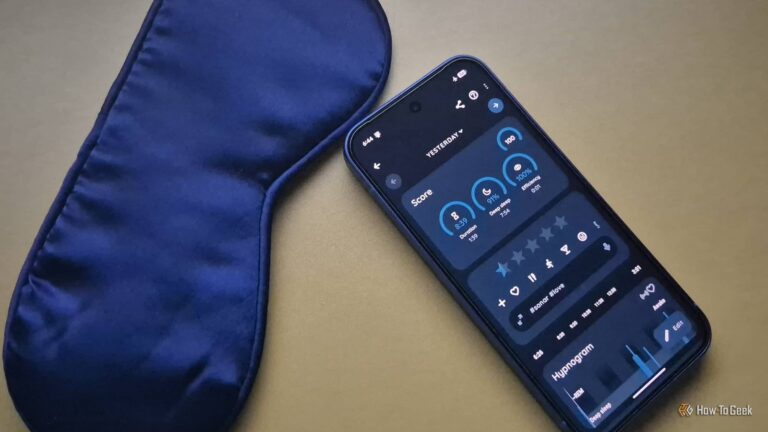
I tried using my Galaxy Watch as a sleep tracker, but it never really stuck. So, I went in the opposite direction and turned an old Google Pixel 6a into a dedicated bedside sleep companion instead. After making a few specific optimizations, it not only helped improve and stabilize my sleep schedule but also did a decent job of tracking my sleep.
Why I never got into a smartwatch as a sleep companion
I don’t like being touched while I sleep
The first smartwatch I ever bought—the Galaxy Watch 4—was specifically for sleep tracking. But here’s the thing: I’d never worn a wristwatch in my life. And having that constant pressure around my wrist actually made it harder to fall asleep.
Sure, I could loosen it for a more comfortable fit, but that would hurt the overall accuracy. The sensors on the back of the watch need to stay in contact with my skin to take accurate measurements, but if it’s strapped on loosely, and I move around in my sleep, it won’t be able to measure my heart rate or blood oxygen levels with any meaningful accuracy.
There’s also the issue of charging. Using your smartwatch to track sleep complicates the charging schedule. A typical Android smartwatch like my Galaxy Watch 4 only gets around 20–24 hours of battery life. If I charge it at the start of the day, there’s a good chance it might die in the middle of the night. But if I charge it before bed, I’m starting the next day with a watch that’s only at around 40–50%. As such, I stopped using my smartwatch for sleep tracking and started looking for alternatives.
I thought smartwatches were cool, five years later I’m ditching mine
It’s time for a different kind of watch.
How can a smartphone replace a smartwatch
Your smartphone already has a bunch of helpful sensors
Smartwatches come packed with a bunch of health-focused sensors that smartphones simply don’t have. So, without all that dedicated hardware, how can a phone replace a smartwatch? Well, it really comes down to what you actually need from sleep tracking.
For me, the main goal is fixing my sleep schedule. Right now, my routine is at the mercy of deadlines. On busy days, I stay up late and wake up early. On lighter days, I sleep in to make up for the lost rest. But that kind of inconsistency isn’t healthy, and it’s something I want to fix.
At the same time, while I’m not particularly interested in tracking my heart rate or blood oxygen levels overnight, I do want to know how well I slept. Am I waking up in the middle of the night, tossing around, talking in my sleep, or am I snoring—which can sometimes be a sign of sleep apnea?
Fortunately, smartphones already have enough hardware to give you a decent read on most of these metrics. For example, if you place your phone on your bed, its accelerometer can pick up subtle vibrations in the mattress to detect movement while you sleep. Likewise, the microphone can record audio to detect snoring or sleep talking. So while a phone can’t fully replace a smartwatch, it can deliver most of what I actually need—the only question is how.
How I Use Sleep Tracking and My Smart Home to Improve My Sleep
Tech can measure your sleep quality and help improve it
Repurposing my old smartphone as a bedside sleep companion
The boring phone that fixed my nights
First things first, I decided to use an old spare phone for this setup—a Google Pixel 6a. I didn’t want to use my main phone because it has everything on it: work apps, entertainment apps, social media—the lot. If that phone were next to my bed, there’d always be the temptation to pick it up and start doom-scrolling right before sleep or the moment I woke up. Using a spare phone with none of those distractions felt like the smarter move.
As for the setup, the first step was keeping it completely offline. I didn’t insert a SIM since I wasn’t expecting calls in the middle of the night, and I didn’t connect it to my home Wi-Fi either. I also kept the display in grayscale with Night Mode turned on. The first makes the screen less visually stimulating by stripping out color, while the second reduces blue light exposure—which, at least in theory, should be good for my sleep.
Beyond that, there are just two core apps. First is Obsidian, which I use as an offline note-taking app. It works as my sleep journal and also as a place to quickly dump thoughts whenever they’re keeping me awake. Then there’s the star of the show: Sleep as Android, which comes with a full suite of features designed to help you sleep better.
The app can set alarms, track your sleep using the accelerometer or sonar (more on that later), analyze nighttime noises to estimate sleep quality, and more. It can even integrate with a range of other services—including your smartwatch—for a more complete overview. The setup wizard walks you through everything, so I won’t bore you with the setup process. Instead, I’ll focus on the more interesting part: how it actually helped me sleep better.
How is this setup helping me sleep better
It’s all about deliberate use
The whole process starts at around 11 p.m., when Sleep as Android sends me a bedtime notification. That’s my cue to get ready for bed, and with a quick swipe, I can start sleep tracking. Once it’s enabled, I place the phone on my bed and try to fall asleep. To help with that, Sleep as Android can play lullabies, white noise, radio stations, or even podcasts and playlists saved on Spotify.
If I’m still struggling to sleep, I open Obsidian and use voice typing for a quick thought dump—just to get everything out of my head. I’ve always found this to be an excellent stress reliever, and it helps me unwind.
Once I’m asleep, Sleep as Android uses the accelerometer, microphone, and ambient light sensor to monitor my movement while I sleep, along with noise and light levels in my bedroom. It combines all of that data to estimate my sleep quality and track how many times I woke up during the night.


I compared those results against my own recollection of waking up and found them fairly accurate. There’s also a noise analysis feature that can detect snoring, sleep talking, or any other sounds in the room—and that worked as expected. You basically get a complete audio recording of the entire night with spikes in a graph indicating loud noises. The app automatically labels these spikes, but you can also manually check them.
Your Android phone is secretly a loudness meter, light meter, and thermometer
Is there anything these slabs of glass can’t do?
Beyond that, the app also estimates how long you spend in deep sleep and REM sleep. It’s a nice feature to have, but I don’t put much trust in those measurements—whether they come from a phone or a smartwatch. There are studies showing that wearables aren’t particularly reliable at detecting quiet wakefulness or accurately tracking sleep stage transitions.
The more useful feature, though, is the alarm system. It gives you granular controls to set up different wake-up alarms for different days. You can also set how long you want to sleep for, and the sleep notification will get scheduled accordingly. This is particularly useful if you’re following a Sleep Restriction Therapy (SRT) protocol to fix your sleep schedule.
The app also forces you to solve a captcha before you can dismiss an alarm. That stops you from blindly hitting snooze and drifting back to sleep for another hour. There are multiple captcha options too, like solving a math problem, laughing out loud, or vigorously shaking the phone.
My personal favorite, though, is the QR code challenge. I’ve placed QR codes in my kitchen, so when the alarm goes off, I have to physically get up and walk there to turn it off. That not only guarantees that I’m getting out of bed, but also hydrating myself.
What about the “Sonar” feature
Sleep as Android offers a feature called Sonar, which uses your phone’s speaker to emit sound and then uses the microphone to capture its reflections. The idea is to use the variance in that sound signature to detect if, and when, you move in your sleep. In theory, this means you can keep the phone on your nightstand instead of on your bed, which reduces the risk of accidentally knocking it off your bed.
Some users swear by the Sonar feature and say it works perfectly for them. But in my testing, it was way off. It failed to detect how many times I woke up during the night—even when I physically got out of bed to use the bathroom. My guess is that it’s because I sleep with the air conditioning running, so the constant ambient noise may interfere with its calibration. There’s also the fact that I’m using an older phone, and I imagine the quality of both the speaker and the microphone is pretty important for this feature to work reliably.
That said, I wouldn’t discourage you from trying it yourself. If you sleep in a quieter environment, there’s a good chance it might work much better for you.
This open-source app turned my Android phone into a portable physics laboratory
Your phone is a scientific suite disguised as a doomscrolling device.
Can your phone replace your smartwatch as a sleep companion?
If you want access to your heart rate and blood oxygen levels while you sleep, then no, a smartphone can’t replace your smartwatch. It simply doesn’t have the hardware for that. But if, like me, all you want is a device that helps you fall asleep faster and wake up on time, then yes, an old spare smartphone is more than enough for the job.


